Walls Controls & HUD Deep Dive
Read every bar and menu on PC or mobile so movement, combat, and Settings stop fighting you.
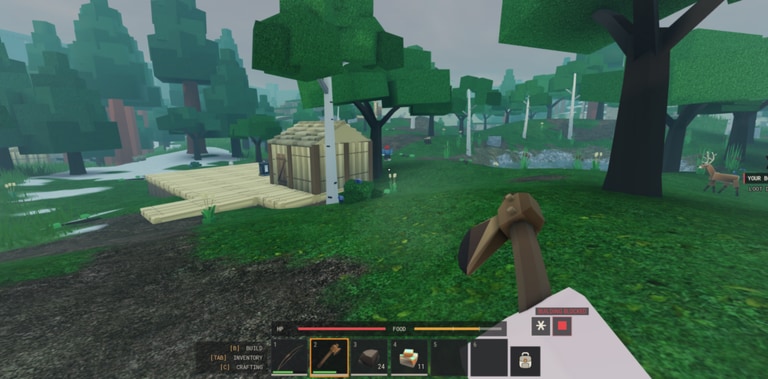
This Controls & HUD guide is the deep dive for Walls by Hook Inc — how to read Health, Stamina, and Hunger, where Inventory, Crafting, Shop, Faction, and Settings live, and which input habits keep you alive in a shared world of up to 50 players. Pair it with Getting Started for the first-session checklist and Survival for bar management on long routes.
Walls is a released Roblox experience (16 October 2026) with melee and ranged combat, day/night, and weather. After the 16 November 2026 client update window, re-open Settings once even if you “already know the binds.” Silent UI moves are common in early live seasons.
Platform baseline (PC and mobile)
Exact labels can shift; confirm everything inside Settings on your device.
PC habits
| Action | Typical Roblox default | Walls note |
|---|---|---|
| Move | WASD | Walk is the default productive speed |
| Jump | Space | Watch parapet edges at night |
| Camera | Mouse | Keep horizons level on wall peeks |
| Sprint | Shift (verify) | Spends Stamina — never recreational |
| Interact / gather | E or click prompt | Rebind if gather “feels broken” |
| Attack | Left click / primary | Melee swings and bow fire |
| Aim ranged | Right mouse / aim bind | Bows need aim discipline |
| Inventory | Backpack key or HUD | Close it before fights |
Mobile habits
- Place the sprint control where your thumb will not brush it while camera-dragging
- Keep interact large enough that wall prompts are not missed mid-climb
- Prefer a layout that leaves Health / Stamina / Hunger visible while you aim
- Lower camera sensitivity if weather plus 50-player fights make aiming nauseating
- Re-test jump + camera after any client update — mobile thumb zones drift when UI scales change
If your faction calls “interact on the crate” and nothing happens, say your bind out loud. The Players Hub covers etiquette; this page covers making the inputs trustworthy.
Reading the three survival bars
Official screenshots show persistent Health, Stamina, and Hunger. Treat them as a contract, not decoration.
Health
Health is the consequence meter. It drops from spears, bows, falls, and stacking bad peeks. Before you accept a duel on open ground, glance at Health. Before you jump a gap on the outer ring, glance again. Healing and resets belong in inner rally space your faction controls — not on a contested stair while you fumble Inventory.
Stamina
Stamina funds sprinting, swinging, drawing bows, and climbing approaches. Empty Stamina mid-fight means your new objective is terrain, not kills. Train a hard rule: never begin a wall climb already winded, and never open a chase when the bar is already blinking.
Hunger
Hunger is the clock on exploration. Check it before leaving inner works. Carry a food buffer. Turn around at a pre-agreed threshold, not when the bar is already a crisis and an enemy appears. Details and route math live in Survival; the HUD skill is simply looking at the bar on a timer, not only when you feel weak.
Menu map: where systems live
| Panel | What you do there | Common failure |
|---|---|---|
| Inventory | Carry food, mats, tools; triage before fights | Rearranging bags mid-spear check |
| Crafting | Turn wood and mats into kits | Hoarding raw mats “for later” forever |
| Shop | Fill true gaps crafting cannot cover | Panic buys after every death |
| Faction | Join, found, rally, upgrade with the group | Ignoring it until you are already isolated |
| Settings | Binds, audio, comfort, graphics | Never rechecking after a client update |
Open each panel once at spawn until your fingers find them without hunting. Crafting and Shop economy depth is in Crafting & Shop; Faction ops are in Factions.
Inventory under pressure
- Food access beats alphabetical sorting on a slope
- Drop junk before a fight; sorted bags do not block spears
- Keep emergency craft components only if your loop depends on them
- After death, rebuild the food buffer before revenge glam
Crafting and Shop placements
Stand in relatively safe inner space when you browse recipes or prices. Menu tunnel vision on a contested plaza is how archers farm beginners. Price-check Shop once per session so you know what a panic buy costs — then buy only when a gap is real.
Faction button literacy
Know the Faction entry well enough to open it while rotating off a wall face. If you cannot find Faction without a guided tour, you are not ready to call a defense. Join timing and territory layers are covered in the factions guide; here the skill is muscle memory to the panel.
Movement and combat input habits
Movement
- Default to walk inside productive loops
- Sprint only to avoid confirmed danger or to hit a called tile
- Stop sprinting before a climb so you crest with Stamina left
- Strafe peeks on parapets instead of standing still silhouettes
- Practice one full day cycle with recreational sprinting forbidden
Combat inputs
- Bow — peek, aim, shoot, disappear; count draws against Stamina
- Spear / melee — swing with purpose at gate width; whiff spam is Stamina donation
- Swap — when enemies are on your tiles, stop hard-aiming into a spear
- Disengage — bind awareness matters; you need a sprint reserve to leave
Full geometry and role kits live in Combat. Controls takeaway: your binds should make peek-shoot-reset and hold-width-reset feel boringly easy.
Settings checklist after the 16 November 2026 client update
Hook Inc’s client showed an update window around 16 November 2026 while visits sat near ~1.42M, favorites near ~25.9k, and concurrency often in the thousands (~4k observed). After any such bump, run this list before you stake night territory:
- Open Settings and screenshot or note current sprint / interact / attack / aim binds
- Confirm mobile thumb zones still match your muscle memory
- Check whether any new HUD glyph appeared near Inventory, Shop, or Faction (including a possible future Codes entry — still unverified; see Codes)
- Re-test audio so callouts beat ambient weather noise
- Lower graphics if 50-player fights plus weather crater your frame rate on wall edges
- Walk an inner circuit watching only the three bars for two minutes
- Tell faction chat if a bind changed so buddies stop assuming your old setup
- Skim Updates for the retest checklist tied to this client bump
Do not install random executors because menus feel different. Empty Scripts status means unverified — not “find a GUI elsewhere.”
Shared-world control discipline (50 players)
- Assume someone already covers the angle you are about to peek
- Close Inventory before you crest a stair
- Call “low stamina, rotating” instead of silently dying on a chase
- Prefer readable chat binds over elaborate emote wheels during defense
- Rejoin from the official experience link on the Links Hub if UI desync makes panels unresponsive after a hot update
Ten-minute controls workout
- Two minutes — open Inventory, Crafting, Shop, Faction, Settings in order without looking at tooltips twice
- Three minutes — walk the inner wall; glance Hunger every 20 seconds; no sprint
- Three minutes — five parapet peeks with full stamina resets between shots or swings
- Two minutes — intentionally empty Stamina safely, then practice the retreat path to inner rally
Repeat after patches. Muscle memory decays when Hook Inc moves a button.
How this page fits the learning path
- Spawn literate — Getting Started
- Make inputs trustworthy — this Controls & HUD guide
- Keep bars alive on routes — Survival
- Fund kits — Crafting & Shop
- Stop playing alone — Factions
- Hold tiles — Combat
- Stay current — Updates and Players
Related reading
- Guides Hub — full walkthrough index
- Tier List — why Hunger and Stamina stay S-tier
- Codes / Scripts — honest empty status; do not derail Settings time chasing fakes
Master the HUD and your binds, and Walls stops feeling like a mystery simulator with a fortress background. The Construct can wish you a productive season — readable bars and clean inputs are how you actually deliver one.
Frequently Asked Questions
Quick answers to the most common Walls questions.
Where do I rebind controls in Walls?
Open Settings from the HUD on PC or mobile. Confirm sprint, interact, attack, and aim binds after every client update, including the mid-November 2026 bump.
What should I watch on the HUD while moving?
Hunger before trips, Stamina before climbs or chases, and Health before open-ground fights. Close Inventory before combat.
Do PC and mobile use the same Walls systems?
Yes — Health, Stamina, Hunger, Inventory, Crafting, Shop, Faction, and Settings are the same systems. Layout and thumb risk differ, so recheck Settings on each device.
What changed after the November 16 2026 client update?
Treat it as a retest window: re-open Settings, verify binds and HUD placements, and run a short inner-wall bar drill before night defense. See the Updates Hub checklist.
Which guide should I read with Controls & HUD?
Getting Started for the first session, Survival for bar routes, and the Players Hub for etiquette. Combat covers bows and spears once inputs feel clean.